


How to apply and enroll to Vocational Programs and Advanced Courses
CYBERSECURITY NOTICE:
ACCESSING ONLINE SERVICES FROM OUTSIDE EUROPE
Starting 12 September 2025, access to certain online services (e.g. Esse3, U-GOV, PagoAtenei, U-Web HR) will be restricted from non-European countries.
For info and updates on this matter, please visit the relevant webpage.
Before applying, carefully read the Call for Admission and the course Annex of your interest to proceed correctly with the application.
- IF the platform listed for course application is DreamApply, click HERE and follow the instructions provided by the system
- IF the platform listed for course application is the RESERVED AREA, please follow the instructions below.
To apply, the following steps must be taken:
1) Register on the Student Portal: from the menu, at the top right, click on the REGISTER button and fill in the required data (TUTORIAL available at the end of this chapter). Once the procedure is completed, the system will assign a USERNAME and a PASSWORD to be carefully kept to be used in subsequent phases.
Those who have already been enrolled at the University of Pavia must select the LOGIN button, instead, directly from the same menu. If you wish to retrieve or change your password, follow these instructions.
2) Select the following path from the menu: ADMISSIONS > ADMISSION TESTS > COMPETITIVE EXAM REGISTRATION and choose the course of interest (TUTORIAL available at the end of this chapter).
3) During the application, it is necessary to upload scanned copies of the following documentation:
- identity document uploaded during registration (front and back)
- complete curriculum vitae,listing the requirements for admission or any selection criteria indicated in art. 7 (Vocational Program) or art. 6 (Advanced Course) of the Annex to the Call for Admission of interest
- documentation required in art. 9 (Vocational Program) or art. 8 (Advanced Course) 'Attachments to upload for the admission application' of the Annex to the Call for Admission of interest.
Candidates holding an ACADEMIC QUALIFICATION OBTAINED ABROAD, equivalent in duration and content to the Italian academic title required for access to the course of interest, may apply for admission. During the online application procedure and within the deadlines set by art. 8 (Vocational Program) or art. 7 (Advanced Course) of the Attachment to the Call for Admission of interest, they must ALSO upload scanned copies of the following documents: 1. Academic qualification required for admission issued in English/Spanish/French or officially translated in Italian
PLEASE NOTE: it is not mandatory to have the Legalization/Apostille/Statement of Verification, if not available yet, during the online application; but it will be necessary to have it within the enrollment deadline. 2. Transcript of records (list of and relevant marks) issued in English/Spanish/French or officially translated in Italian 3a. IF your title HAS NOT been obtained in one of the Countries that are signatories to the Lisbon Recognition Convention
3b. IF your title HAS been obtained in one of the Countries that are signatories to the Lisbon Recognition Convention
PLEASE NOTE: it is not mandatory to have the DoV/Statement of Comparability/Diploma Supplement/Statement of Correspondance, if not available yet, during the online application; but it will be necessary to have it within the enrollment deadline. International applicants residing abroad must respect the 'Procedures for foreign students’ access to university courses in Italy', which can be consulted on the website of the Ministry of Education, University and Research. If the candidates are VISA applicants, they must also complete the registration on the Universitaly portal as described in the relevant section. |
4) Pay an application fee of € 50, using the PagoPA system, within the deadlines set by art. 8 (Vocational Program) or art. 7 (Advanced Course) of the Attachment to the Call for Admission of interest: once the application process is completed, the candidate must return to the main page of the Homepage of the Student Portal, click on PAYMENTS, and select the invoice to be paid. The payment will be confirmed by the University within a few working days.
For international candidates residing abroad, payment can only be made by credit card, still using the PagoPA system. In case of problems in making the payment from abroad, contact the dedicated office at the email address: master.ateneo@unipv.it.
1) Find out whether you need to apply for a study VISA:
- EU citizens do not need it
- non-EU citizens, residing outside of Italy, need to submit an online application in order to request a study VISA (type D).
To find out whether you need to apply for a study VISA at the Italian Embassy/Consulate in your country of residence - and what documentation you need - follow this link.
Further and detailed information is available on the website of the Ministry of Education, University and Research.
2) Submit your application for a study VISA:
as established by the Italian Ministry of University and Research (MUR), the application for a study visa must be submitted online through the Universitaly portal (GUIDELINES available at the end of this chapter).
Bear in mind to upload a scan of:
- passport
- photocard
- documents proving your education and that you comply the admission requirements for the post-graduated course of your interest (study diploma, certificate of degree, transcript of records, DoV,...).
Please note that the deadline to submit your application are set by art. 8 (Vocational Program) or art. 7 (Advanced Course) of the Attachment to the Call for Admission of interest.
3) Contact the Organizational Secretary of the course of your interest: if your admission to the post-graduated course is approved, your Universitaly application will be also approved and sent to the relevant authorities.
4) Complete the VISA application at the competent Italian authority:
the application must be completed at the competent diplomatic authority in your country. Check the Italian Embassy/Consulate contacts here.
PLEASE NOTE:
with a VISA you are only allowed to travel back and forth to Italy.
Remember to upload it on your Student Portal to confirm your enrollment at the University of Pavia.
ATTENTION:
- if you are a non-EU student (applying for a study VISA), make sure you have submitted your application on the Universitaly portal and that the VISA has been released
- only admitted candidates can proceed to the enrollment procedure
- admitted candidates must pre-enroll within the deadline indicated by the Organizational Secretary in the enrollment opening communication sent by e-mail.
To enroll, the following steps must be taken (TUTORIAL available at the end of this chapter):
1) Log in your Student Portal and select the following path from the menu: REGISTRATIONS > ENROLLMENT > STANDARD ENROLLMENT > ENROLLMENT IN PROGRAMMED ACCESS COURSES (with selective entrance test) and follow the on-screen instructions provided by the system.
2) After confirming the post-graduated course you intend to enroll in, the system will require you to upload a passport-size photo showing the candidate's face clearly.>
3) Upload scanned copies of the following documents:
- identity document uploaded during registration (front-back)
- tax code ('codice fiscale')
- residence permit/card OR study VISA (only for students with non-EU citizenship).
4) Complete the procedure for the selected post-graduated course.
5) Pay the enrollment fee within the deadline indicated by the Organizational Secretary in the enrollment opening communication sent by e-mail.
The Office will proceed to enroll those eligible, after receiving the enrollment fee payment and the required documentation within the prescribed deadlines. Candidates are enrolled conditionally pending verification of the admission requirements
6) Candidates with an academic qualification obtained abroad, in order to finalize their enrollment, must also deliver to Ufficio Master - Servizio Medicina e Post Laurea - Via Ferrata 5, 27100 Pavia, within the deadline for enrollment:
|
Tax Code (“Codice Fiscale”) is the Italian tax identification number which is necessary to buy a SIM card, open a bank account, rent privately and apply for residence permit.
Please be aware that you must obtain the official copy of your Tax Code (on a paper stamped by “Agenzia delle Entrate” – Tax Agency), since the one generated automatically by the online calculation system/the University system is only an unofficial version of it.
You can obtain your Tax Code before or after arriving in Italy:
1) BEFORE YOUR ARRIVAL > if the Italian Consulate/Embassy in your country offers this service, you can request an official Tax Code before your departure to Italy, during the VISA application process or the DOV request process.
2) AFTER YOUR ARRIVAL IN ITALY > only if enrolled, you can request it to the Revenue Agency (“Agenzia delle Entrate”) writing an e-mail to dp.pavia.utpavia@agenziaentrate.it with the following text:
“Gentilissimi,
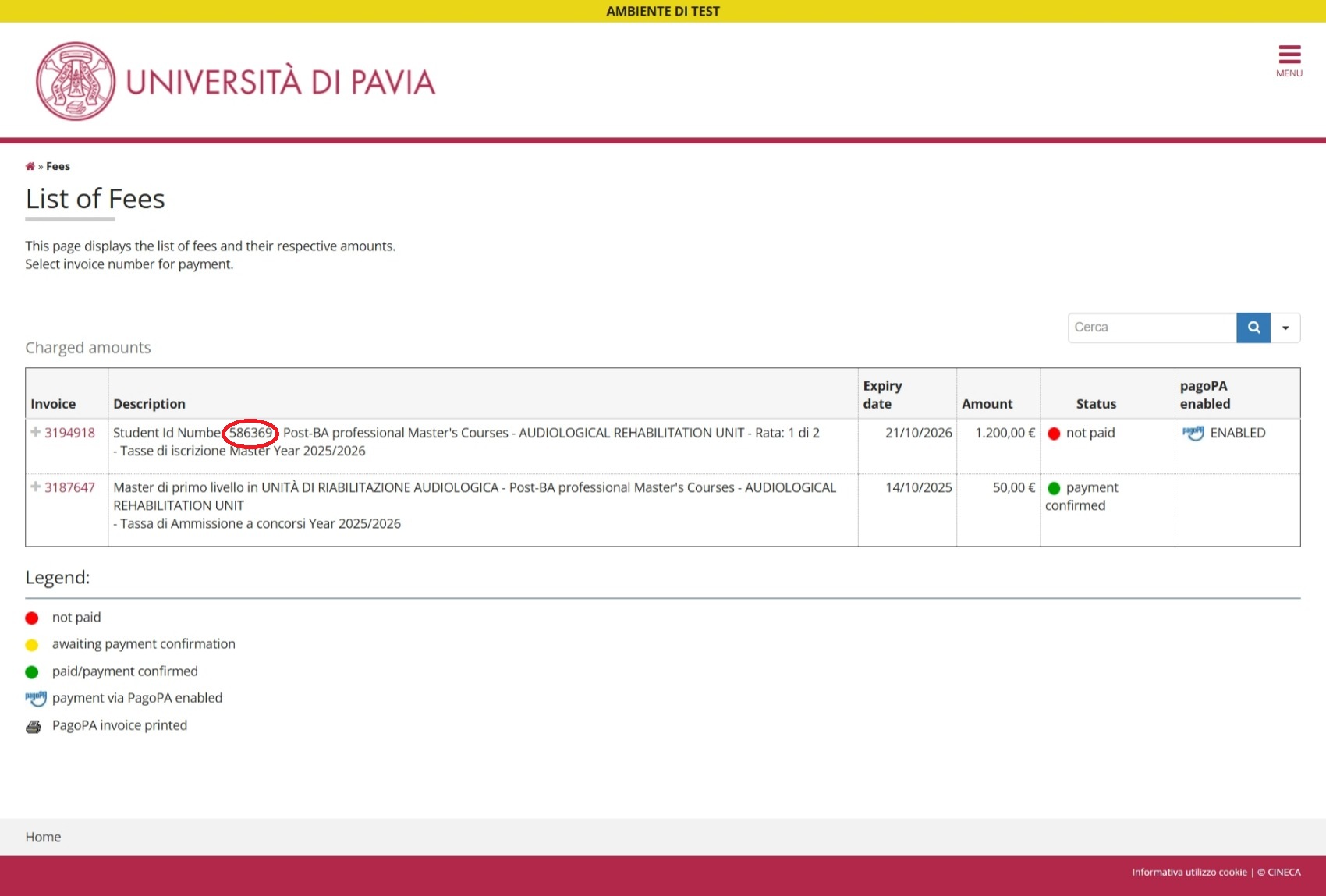
Vi inoltro la mia richiesta di codice fiscale. Sono uno studente internazionale immatricolato presso l’Università di Pavia, numero di matricola xxxxx (specify your matriculation number visible on the payment screen of the Student Portal, once you have completed the enrollment procedure). Allego il mio documento di identità e il modello AA4/8 compilato in lingua inglese.
Molte grazie per l’attenzione.
Cordiali saluti,
YYYY (sign with your name)“
Documents to be attached to the e-mail:
- ID document
- VISA (only for Non-EU students)
- this FORM completed with all the required info (here instructions on how to complete the form).
Please be aware that personal data must be exactly the same as in the ID document.
Remember also that the Italian address is mandatory (in case you haven’t found a definitive accommodation yet, you can enter a temporary address in Pavia and province).
Revenue Agency will send you the tax code, via e-mail, within 1/2 weeks.
Attention: please send your new Tax Code to the Post Graduated Office to keep your Student Portal unblocked.
International students must cover the whole length of their studies in Italy with a Health Insurance.
Being covered by a Health Insurance is compulsory in order to apply for the Residence Permit that will last as long as your insurance
EU CITIZENS You can find here further information about this card. |
NON EU CITIZENS 1) Register with the Italian National Health Service (“SSN”) to get the Health Card (“Tessera Sanitaria”) and rely on public Healthcare as if you were Italian. The SSN will give you access to a general practitioner and reduced prices for medical examinations and treatments.
and specifying the contribution is for year 2026. Once you have obtained the payment receipt, it will be possible to apply for the Residence Permit. The necessary documents for the assignation are:
2) Purchase a private Health Insurance from abroad or in Italy. |
Non-EU students must request the Residence Permit ('Permesso di soggiorno'), within 8 days from their arrival in Italy.
STEP 1 – Help Desk (KIT compilation)
Book an appointment with the Residence Permit Help Desk, a student service which helps students to compile the KIT, provides necessary information regarding the residence permit application process, coordinates between students and the Pavia’s Questura.
Temporary location: Via Sant’Agostino 1, Pavia
E: permesso.soggiorno@unipv.it
WhatsApp: 0039.3312312544
Bring the following documents:
- copy of your passport (without blank pages)
- old residence permit (only in case of renewal)
- enrollment application at the University of Pavia (self-certification of pre-enrolment at the University downloadable from the Student Portal at the end of the enrollment process or by clicking on Menu → Admissions → Self-declaration)
- proof of residence (eg. house contract, hospitality document)
- proof of financial support (eg. copy of credit card, bank statement)
- € 16 revenue stamp ('marca da bollo'), to buy at the tabacco shop.
STEP 2 – Post Office
Submit the completed KIT at the Post Office.
Total cost: €118.46
- the convocation letter with date and time of your appointment at the Immigration Office - Police Station (Questura)
- your receipt (ricevuta assicurata), that is used to identify your request. You can find there the credentials for Portale Immigrazione where you can verify the application process.
All together these documents serve as proof of your legal stay until the residence permit is issued.
Attention: please send the convocation letter and the receipt to the Post Graduated Office to keep your Student Portal unblocked.
STEP 3 – Police Station (Questura) Appointment
Attend your appointment at the Immigration Office, Via Rismondo 68, Pavia. Before going to the Questura, please verify if you need to bring any other missing documents with you on the date of the appointment on Portale Immigrazione besides the following:
- Post Office receipt
- passport
- 2 passport-sized photos
- old residence permit (only in case of renewal)
- health insurance valid for 1 year from the date of the appointment (minimum coverage €30,000).
STEP 4 – Check your status and collect your permit
You can check the status of your application on the Portale Immigrazione, using the username and password provided on the Post Office receipt.
Processing time is approximately 40 days. You will receive an SMS notification when your residence permit is ready.
When collecting the permit at the Immigration Office, Via Rismondo 68, Pavia, bring:
- passport
- Post Office receipt
- old residence permit (only in case of renewal).
RENEWAL (Questura di Pavia) If you are leaving Pavia for an international mobility period within the Erasmus program: If you still have questions, please consult the FAQ section below. |
Many banks have low fees account offers for students.
BPER
A treasury bank of the University which offers the possibility to open a bank account at special conditions.
Address: Piazzale Ponte Coperto Ticino 11, Pavia)
The Ateneo Card is the identification card of University of Pavia students and is issued by Banca Popolare di Sondrio.
The card can be activated -without any costs- as a prepaid rechargeable credit card and will be used by the University to credit any refunds, scholarships and sums due for student collaborations. It can also be used in stores in contactless mode and for internet purchases.
To request and collect it, please check HERE the instructions.
Then, in order to activate it as a credit card, you will need to book an appointment at the bank by sending an e-mail to pavia.sede@bper.it.
Documents to be handed in:
- passport or valid ID
- Tax Identification Number (TIN) of your abroad residence
- italian Tax Code
- university ID number (“matricola”)
- Ateneo Card number
- address of your abroad residence
- address in Italy
- italian mobile phone number
- Residence Permit (Non-EU only) If you do not still hold it: Receipt of the Residence Permit + Self-certification of enrolment at the University, to be downloaded from the Student Portal
Before being able to make any transaction, it is necessary to make an initial deposit on your bank account.
The procedures to open the bank account and transfer the funds will take up to 15 days, so make sure you have enough money on arrival.
Each postgraduate course requires a dedicated contribution. For further information, please refer to the Attachment to the Call for Admission of interest.
| HOW TO PAY WITH PAGOPA For information on payment methods, please check the TUTORIAL. |
LATE PAYMENT FEE The deadline for the late fee is fictional as it refers to the beginning of the academic year; until it is regularized, it will not be possible to apply for the attainment of the degree. |
EXEMPTIONS To benefit from this exemption, please:
|
REFUNDS
using the procedure available on the relevant webpage. |
TOOLS
CONTACTS

Talk with us
Contact the Post-Graduate Office: master.ateneo@unipv.it
For administrative information only; for information on a specific course and on didactics, please contact the relevant Organizational Secretary.
Book an appointment
DESK in-person
Ufficio Post Laurea - Via Ferrata 5 – Pavia
Tuesday: 10:00-12:00 / 14.00 -16.00
Please note that the desk in-person is only available for issuing certificates and practices not manageable through e-mail or calls.